For hospital facilities teams

Watch a facility
run itself.

Every building problem becomes a coordination problem.
Mono connects the fault, the parts, the people and the next decision.

Simulation with synthetic data. A fictional hospital, people and vendors.
No patient data. No real-world purchases or vendor contact.

Mono / the operations loopA closer look at the product

Watch the fault become a plan—and a request for human approval.

Product film · 16-second excerpt · synthetic demonstration
Mono workspace showing the facility, equipment and work context

An operations layer, not another dashboard

Keep the building moving. Keep people in control.

Air handlers, chillers, boilers and utility systems.
One place to follow the fault and coordinate the response.

Read the product-film transcript

In a synthetic hospital, a facilities operator asks Mono about operating-room humidity. The workspace connects the question to AHU-07, its readings and work history.

A rising humidity chart and an activity record show the reported fault, diagnostics, technician availability and vendor responses. These are illustrative simulation records.

The scene moves through equipment dependencies, a proposed work order and an above-limit spending request. A person reviews the request; Mono does not approve its own spending or close the work order.

The coordination work, handled

From a signal to a clear next step.

Example faultIntake

Air handler alert

A reading crosses its limit. Mono links the signal to the equipment.

Equipment contextReadings checked
01

Find the fault.

Intake opens the work order. Diagnostics reads the equipment history and sensor readings before the plan moves forward.

What gets connected

A work order carries the equipment, source conversation and reported symptom together. Diagnostics reads the history and readings instead of filling in missing facts.

PartsTechnicianRepair slot
Check parts and availability

Planner + Sourcing · illustrative workflow

02

Bring the repair together.

Planner coordinates people and time. Sourcing checks stock, vendor conversations and the approval needed for spending.

How the plan stays grounded

Technician availability, stock, vendor conversations and schedule constraints shape the plan. Life-safety and regulatory blocks stay protected.

Illustrative activity

A traceable decision

  • Fault reported
  • Repair slot prepared
  • Approval requested when required
Human approval when rules require it
03

Keep the decision human.

Database policies enforce the configured limits. Mono requests approval above those limits; people approve spending and close work.

Where the person decides

Above-limit spending becomes an approval request. Mono cannot approve that request or close the work order itself. Evidence stays attached to the decision.

Mono / working thread

Less chasing.
More moving forward.

A fault shouldn’t become six disconnected conversations. Mono keeps the evidence, the repair and the next decision in one thread.

Air handler / humidity alert Synthetic example

  1. Understand the signal

    Equipment, readings and work history—together.

  2. Prepare the repair

    A proposed repair, with its dependencies attached.

  3. Keep people in control

    People approve spending and close work orders.

What happens behind the scenes
Intake
A work order linked to its equipment and conversation.

People provide missing context and decide what needs attention.

Diagnostics
A contextual description of the fault and what is still uncertain.

Mono reports readings. People make safety and clinical judgements.

Planner
An assignment or proposed schedule change within the configured rules.

Protected life-safety and regulatory blocks never move.

Sourcing
A part order within its limit, or a suggestion and approval request above it.

Purchases in this deployment are simulated. No real vendor is contacted.

Guard
An allowed action—or a clear reason it needs a person or cannot proceed.

Mono cannot approve its own spending request.

Verifier
A traceable account of the result, with its evidence level.

People make the final decision to close a work order.
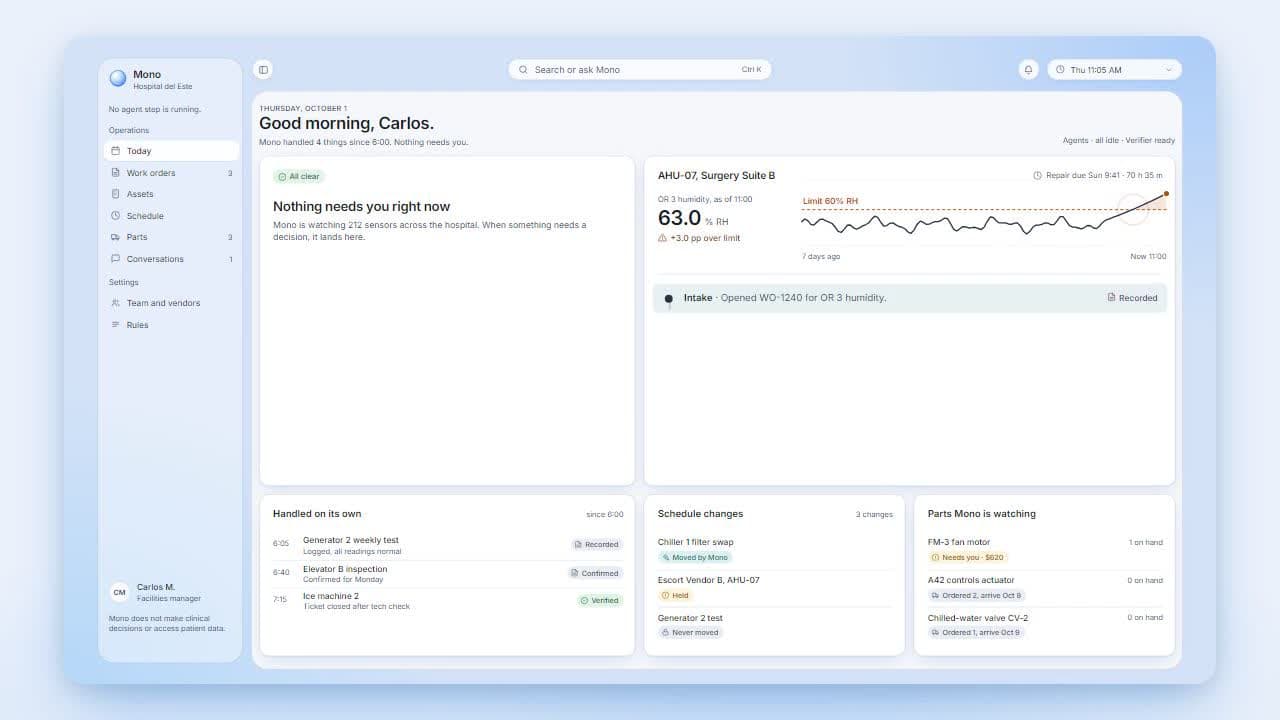
Synthetic walkthrough—not a live activity feed. Actual actions depend on the available records and the facility’s configured rules.

A connected workspace

The whole operation.
Not six disconnected tabs.

Follow equipment, work, parts and conversations in the same facility context.

Built to be checked

Clear boundaries.
Visible evidence.

People approve.01

Actions stay inside the facility’s rules. Spending above configured limits waits for a person. Mono cannot approve its own request.

Evidence stays visible.02

A plan, an agent report and a verified fact are not the same thing. Evidence labels show what is known and what still needs checking.

A fictional hospital.03

The sensors, staff, vendors and incidents are synthetic. This is facilities operations—not patient care, clinical advice or real-world purchasing.

Evidence, from plan to verification
PlannedAgent reportedRecordedConfirmedApprovedVerified
What the evidence labels mean
Planned
A proposed action, not a completed task.
Agent reported
An agent’s account; not independently confirmed.
Recorded
An event stored in the activity record.
Confirmed
Supported by a recorded response or observation.
Approved
A person has approved the request.
Verified
Checked against the available readings or evidence.

Before you explore

A little more context.

What you are looking at, what Mono can do, and what stays with people.

Is this a real hospital?

No. The facility, people, vendors, sensors and incidents are synthetic. There is no patient data, clinical decision-making, real-world purchasing or contact with real vendors.

Does Mono approve its own spending?

No. Actions within configured limits can proceed in the simulation. Above-limit spending and restocking wait for a person. Mono cannot approve its own request, and people close work orders.

What can I explore in the workspace?

Work orders, equipment and readings, parts, schedules, conversations, people, vendors and rules share the same facility context. The workspace links open those views.

Are the animations showing live data?

No. This page uses labelled examples to explain the workflow. The separate Mono app reads the simulation records; its activity depends on the simulation and agent runners.